22/10/2026 15:06
Sizing Question or Disruption? TikTok LIVE Moderation for Cambodian Table-Linen Shops

A tablecloth demonstration becomes difficult when the presenter is measuring fabric, reading comments and answering delivery questions simultaneously. For a Cambodian table-linen shop, a useful TikTok LIVE needs a simple way to decide which questions deserve a demonstration, which belong in private correspondence and which require moderation. This guide uses a hypothetical Phnom Penh shop preparing a table-sizing session. It explains how to divide responsibilities, keep legitimate criticism visible and turn unanswered questions into follow-up work. It also addresses a common SMM-panel mistake: treating a service labelled for livestream views as though it supplies customer support or evidence of local demand.
1. Give the session one practical purpose
Start with a question the host can answer using the products on the table. For the hypothetical shop, the purpose is to explain how tabletop dimensions and the desired overhang affect tablecloth selection. Prepare a rectangular table, a measuring tape and clearly distinguishable cloth samples. Keep unrelated products outside the demonstration area so the moderator can identify what viewers mean when they ask about the cream or teal cloth.
Write a short promise for the opening: viewers will see where to measure and what information to send when requesting a size recommendation. Avoid promising that every viewer will receive a quote during the broadcast. Decide beforehand who can confirm stock, who can approve a price and where a customer should continue an enquiry. Announce the session in the language customers normally use, with the date and Cambodia local time stated clearly.
2. Separate presenting from managing the conversation
Choose a moderator who understands the shop’s products and can follow the languages likely to appear in chat. For this hypothetical business, that means comfortable Khmer reading and enough familiarity with English product terms to recognise a sizing question. The host demonstrates; the moderator collects questions, gives approved factual replies and signals when the presenter needs to clarify something.
TikTok’s LIVE safety guide describes adding moderators through the launch screen’s Settings and moderator options. It also explains that comment controls depend on permissions granted by the creator. Check those controls on the account and device you will actually use. Use the platform’s assigned role instead of sharing the shop’s login.
Prepare a small reference sheet containing sample identifiers, verified dimensions, the approved contact destination and facts awaiting confirmation. Make the limits explicit: the moderator may explain how to measure, but may not invent availability or promise a dispatch date.
3. Route comments by what they need next
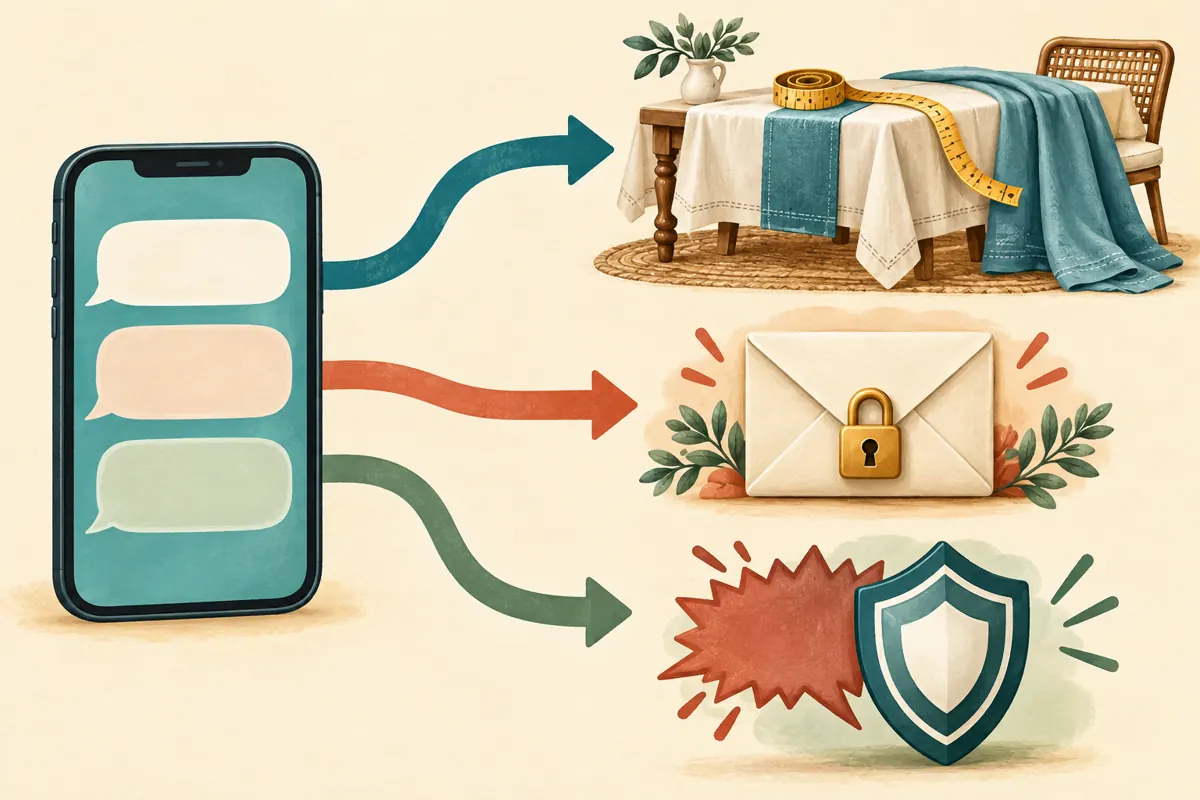
Use three practical categories. Public product questions can help everyone: where to measure, which cloth is being shown or how the edge hangs. Private order questions involve a particular customer’s address, payment, quotation or previous purchase. Disruptive comments include repeated spam, harassment or attempts to derail the demonstration. This sorting method is an editorial workflow, not a claimed TikTok feature.
In a hypothetical exchange, a viewer asks whether the cream cloth suits a round table. The moderator passes that to the host and notes that a different shape needs its own explanation. Another viewer posts an order reference and asks about delivery; the moderator directs them to the shop’s established private contact route without reading the reference aloud. A third repeatedly posts unrelated promotions; that calls for a moderation decision. The distinction is the action required, not whether the comment sounds enthusiastic.
4. Prepare filters without hiding ordinary buying questions
TikTok’s LIVE safety guide documents keyword filters and review of filtered comments. Use these controls carefully. Build a narrow list around problems the shop has actually encountered rather than importing a long generic list that nobody has checked. A filter should reduce disruption while leaving room for people to discuss the product honestly.
For a Cambodian shop, review Khmer spelling, English wording and romanised Khmer with someone who understands the context. Avoid blocking broad terms such as expensive, small, late or wrong: those words can introduce useful questions or genuine complaints. Consider the hypothetical comment, “Is this too small for my table?” Hiding it would remove precisely the uncertainty the session exists to resolve.
During the broadcast, inspect filtered comments when practical and watch for legitimate questions that disappear. If a filter catches harmless wording, narrow it. Record the reason for a filter change so the next moderator understands the decision.
5. Match the response to the behaviour
Agree on a proportionate response before going live. A confused viewer usually needs clarification. A repeated but relevant question may mean the host’s answer was difficult to hear or arrived before the viewer joined. A person posting the same unrelated advertisement after being asked to stop needs a different response. Do not treat disagreement about price or quality as abuse.
TikTok’s safety guide describes reporting, muting and blocking tools. It explains that muting restricts commenting for the selected period, while blocking has broader consequences for access and interaction. Review the available action before applying it.
Keep the host out of prolonged arguments. The moderator can acknowledge a relevant concern, request private details where necessary and let the demonstration continue. For a serious violation, use the appropriate reporting control. If an action was mistaken, review the available reversal options promptly and correct the internal note.
6. Protect personal details during order handoffs
A public livestream is a poor place to collect delivery addresses, telephone numbers or payment evidence. Tell viewers what can be discussed publicly: table shape, approximate dimensions and the sample they mean. Move transaction-specific details to the shop’s established private contact channel. Verify the contact destination before the broadcast so staff do not improvise conflicting instructions.
If someone posts personal information, do not repeat it aloud or include it in a public recap. Use available moderation controls as appropriate and ask the viewer to continue privately. The moderator’s working note should contain only what the follow-up requires, such as “delivery question awaiting private contact,” rather than a copied address.
Keep the commercial boundary equally clear. A chat message expressing interest is an enquiry. It becomes a confirmed order only after the shop’s normal process verifies the product, terms and customer agreement. The moderator should never announce a sale merely because someone comments that they like the fabric.
7. Rehearse the handoff before inviting viewers
Run a tabletop rehearsal using fictional questions read by a colleague. Include a measurement question, a complaint, an ambiguous product reference and a request involving private information. Practise how the moderator signals the host without interrupting every sentence. A quiet note beside the camera or an agreed gesture may be easier than speaking over the demonstration.
Check the practical setup too. Can the host read the sample identifier? Can the moderator hear the explanation while watching chat? Does the camera show where the measuring tape starts? Keep customer paperwork out of frame. These checks make the conversation easier to manage because viewers receive clearer information.
Set a fallback for losing moderator support or connectivity. The host can pause for questions between demonstrations, simplify the session or end with a clear follow-up instruction. Avoid continuing a complicated presentation while unattended comments accumulate.

8. Evaluate an SMM-panel listing against the actual task
The supplied catalogue includes the exact public service name “Tiktok Live Stream Views ~ [15 Minutes]”. Its title labels it as a livestream-view service with a stated time period; the supplied description is empty. That evidence does not establish audience location, genuine users, moderation, enquiry handling, sales outcomes or official TikTok affiliation. Treat the name as catalogue wording, not independently verified performance.
For this shop’s problem, the missing resource is someone who can recognise and route customer questions. A view-service listing does not demonstrate that capability. Before spending, write down the job you need done and compare it with the evidence actually available. An empty description is a reason to leave unsupported assumptions unresolved.
TikTok’s Community Guidelines prohibit trading services that artificially boost engagement or manipulate its recommendation system. Where a proposed service involves artificial engagement, do not use it. Direct this session’s preparation toward clearer demonstrations, trained moderation and honest promotion. Purchased engagement is not evidence of genuine interest, sales, ad delivery or Cambodian users.
9. Close with a useful recap and assigned follow-up
Before ending, repeat the information customers should provide for a size recommendation: table shape, tabletop measurements and the amount of overhang they prefer. Identify which questions remain unanswered and explain how the shop will handle them. Avoid implying that leaving a comment reserves stock or guarantees a reply by a time the team cannot meet.
Afterward, the host and moderator should review a short list of unresolved topics. Separate product-information gaps from individual customer cases. A recurring question about measuring a round table may deserve a new demonstration; a particular delivery problem belongs with the staff member responsible for that order.
Assign each follow-up to a person and a realistic review time. Keep any panel administration record separate from customer enquiries and confirmed transactions. If a visible count changes, record the observation without turning it into a claim that more local buyers attended or that moderation improved sales.
10. Fix the mistakes that make the next session harder
One common mistake is giving the moderator broad responsibility without a product brief. That encourages guessed answers. Another is asking the host to monitor every comment while demonstrating measurements, which can interrupt the explanation at its most important moment. Correct both by defining responsibilities and giving the moderator an approved reference sheet.
Overfiltering is another avoidable problem. A quiet chat is not automatically a successful chat if legitimate questions have been hidden. Review whether viewers could ask about dimensions, care, price and service problems without being treated as disruptive. Equally, do not leave repeated harassment unattended simply to preserve a busy-looking conversation.
Finally, avoid judging the session solely by its visible audience. Ask whether the demonstration answered its promised question, whether staff corrected uncertainty honestly and whether unresolved enquiries reached the right person. Those observations identify concrete improvements without inventing customer intent or treating purchased activity as business evidence.

Frequently asked questions
Does a small table-linen shop need a moderator for every LIVE?
Base the decision on the work involved. A presenter holding fabric and demonstrating measurements may need help even when the audience is small. If no colleague is available, shorten the demonstration, build in question breaks and limit the session to information the host can manage reliably.
Should the moderator remove comments saying the cloth is expensive?
Price criticism alone is not a reason to remove a comment. Explain the relevant product details and answer factual questions without arguing. Moderate behaviour such as harassment or repeated spam according to the agreed approach. Keeping reasonable criticism visible helps the shop understand what customers need clarified.
Can the moderator confirm a custom tablecloth order during the broadcast?
Only within authority the shop has explicitly given them and after its normal checks. A public comment rarely contains everything needed for a custom order. Move the enquiry into the established private process, verify measurements and terms, and distinguish an expression of interest from an accepted order.
Would a livestream-view service make the question-and-answer session more useful?
A catalogue label for views does not establish useful questions, Cambodian participants or buying interest. It also does not provide a moderator. Evaluate the actual service against TikTok’s rules; artificial engagement services conflict with its stated restrictions. Better preparation directly addresses the operational problem described here.
Explore the current service catalogue, create an account, or ask a specific question through support tickets.
- TikTok LIVE safety guide — moderator permissions, comment filters, muting and blocking
- TikTok Community Guidelines — deceptive behavior and fake engagement
Prepared with AI assistance. Illustrations explain the workflow and do not represent customer results.